
Hi everyone,
I can't login my google account with gee code editor trusted tester access windows?
Image Link: https://drive.google.com/file/d/1gh5TeS-_iBKxqgmGdDSZ_rftqdlyI-Kw/view?usp=sharing
I hope I've spelled correctly.
Hi everyone,
I can't login my google account with gee code editor trusted tester access windows?
Image Link: https://drive.google.com/file/d/1gh5TeS-_iBKxqgmGdDSZ_rftqdlyI-Kw/view?usp=sharing
I hope I've spelled correctly.
asked
ormserdar 26●9●16 accept rate: 0%
Accepted answer
Following up on this:
The current GEE App that is used by Collect Earth is quite complete : SEE EXAMPLE PLOT!
BUT, if you want to use your own GEE App then you can set it up by changing the earth.properties file and edit this property:
gee_app_url=https\://collectearth.users.earthengine.app/view/plot
The code for the script ( it uses the new ui.url.get method ) is here : https://code.earthengine.google.com/?scriptPath=users%2Fsanchezpauspro%2FApps%3ACollectEarthPlotAncillary
The GEE App results on this (see how the polygon is passed as a parameter): https://collectearth.users.earthengine.app/view/plot#geoJson={%22type%22:%22MultiLineString%22,%22coordinates%22:[[[100.0,%200.0],[101.0,%201.0]],[[102.0,2.0],[103.0,3.0]]]}
Here is how to publish apps if you haven’t done it before: https://developers.google.com/earth-engine/apps
The script refers to this other script that actually does most of the work: https://code.earthengine.google.com/?scriptPath=users%2Fcollectearth%2Fce_scripts%3Aframes_landsat_v4
The script refers to this repository: https://code.earthengine.google.com/?accept_repo=users/collectearth/ce_scripts
You can follow the same idea we have for the default GEE App used in Collect Earth (publishing a GEE App that takes a polygon as an argument) and then modify the earth.properties file so that the gee_app_url refers to this new URL.
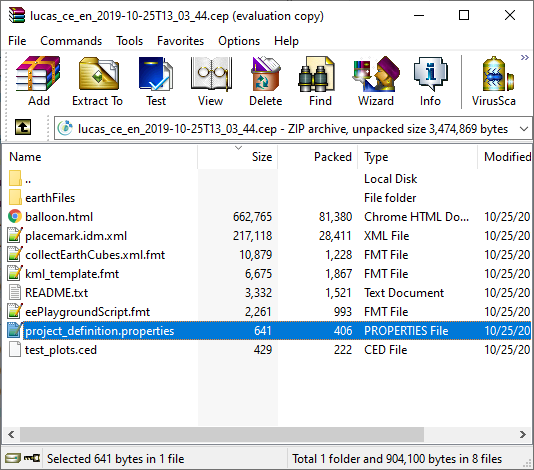
The gee_app_url can also be set inside the project_definition.properties file in the CEP so that anyone that receives this CEP use the same URL without needing to modify any configuration file.
answered
Open Foris ♦♦ 1.1k●5●7●14 accept rate: 10%
Accepted answer
Ciao Serdar!
This is a known problem in Collect Earth that originates from the use of Selenium in order to automatize the use of the GEE Code Editor browser window. Google blocks the authentication of the user when it detects that browser is controlled by Selenium Web Driver.
We have, since version 1.10, a workaround for this problem: to use a Google Earth Engine App (rather than the direct access to the Code Editor). This new integration has the same basic idea than the code editor integration but requires no sing-in by the user! This is a great advantage as the operators don't need to register to GEE when organizing a Mapathon
In order to use this option please go to Collect Earth Properties dialog and check this :

answered
Open Foris ♦♦ 1.1k●5●7●14 accept rate: 10%
Once you sign in you will be able to subscribe for any updates here


