Collect Earth unanswering questions for random samples

  • Asked
  • Active
  • Viewed 2919 times
0

I think there is a bug that's causing Collect Earth to unanswer a survey question for a sample that I've already collected and answered all the questions for. And it's unanswering the first question in the survey, so I know I previously answered that because otherwise I wouldn't have been able to continue on to the second question - which is keeping the answer currently.

Also weird - when I zoom out from re-answering the survey questions, even more samples have been unanswered:(

0

Accepted answer

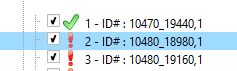
I think what you refer to is that the icon accompanying the plot in the left frame of Google Earth remains with the RED exclamation mark (the visual indication that a plot has no data collected).

alt text

This is indeed a bug in Google Earth that stops updating the icons. BUT the issue is just "visual". Meaning that even if the icon is still RED (indicating in unanswered) the data from the form is stored inside the Collect Earth database.

SIMPLEST FIX:

  1. In Collect Earth click on the Properties button
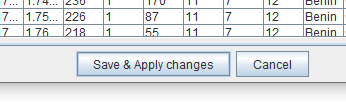
  2. Then just click on the Save & Apply changes button. This forces Google Earth to update all of the icons of the plots (the wrongly marked unanswered plots will change their icon to the green tick that indicates that they have been answered )

alt text

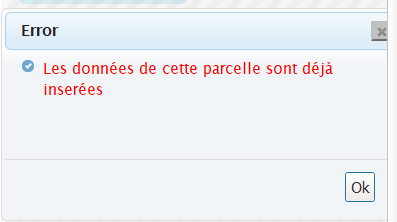
Also, if you click on a plot that has already been filled, you should get this dialog indicating that all the data for the plot has been filled and validated (you do not need to reassess it )

alt text

Thank you for your response. I think we are referring to different platforms. My issue is with the Collect Earth online site: https://collect.earth/

So I do not see the exclamation marks you mentioned. What it looks like is the polygons I drew and answered both survey questions for change their color to be black with a slight outline of the original color indicating the answer, but it shows that I need to answer the survey for that polygon again.

anikaberger anikaberger
0

Accepted answer

Hey @anikaberger, could you please share some additional information to help us pin down the issue? Which project are you seeing the issue in? And when you observe this behavior, are there othe users also collecting data? Finally, is it happening every time in every project or is the problem intermittent?

Your answer

Markdown text. Shortcuts: Ctrl+B bold, Ctrl+I italic, Ctrl+K link, Ctrl+E code, Ctrl+Shift+V paste as plain text. Tab indents list items and code; press Escape, then Tab, to leave the text box.

Insert an image

Say what the image shows, for people who can't see it.

Keyboard shortcuts

Anywhere

?
Show this list
/
Search
g h
Go to the home page
g q
Go to the questions
g t
Go to the tags
g u
Go to the users
a
Ask a question

Lists of questions

j k
Next or previous question
Enter
Open the question

Question pages

j k
Next or previous post

Shortcuts never apply while you type in a text field. Members can turn them off in their preferences.