0
1

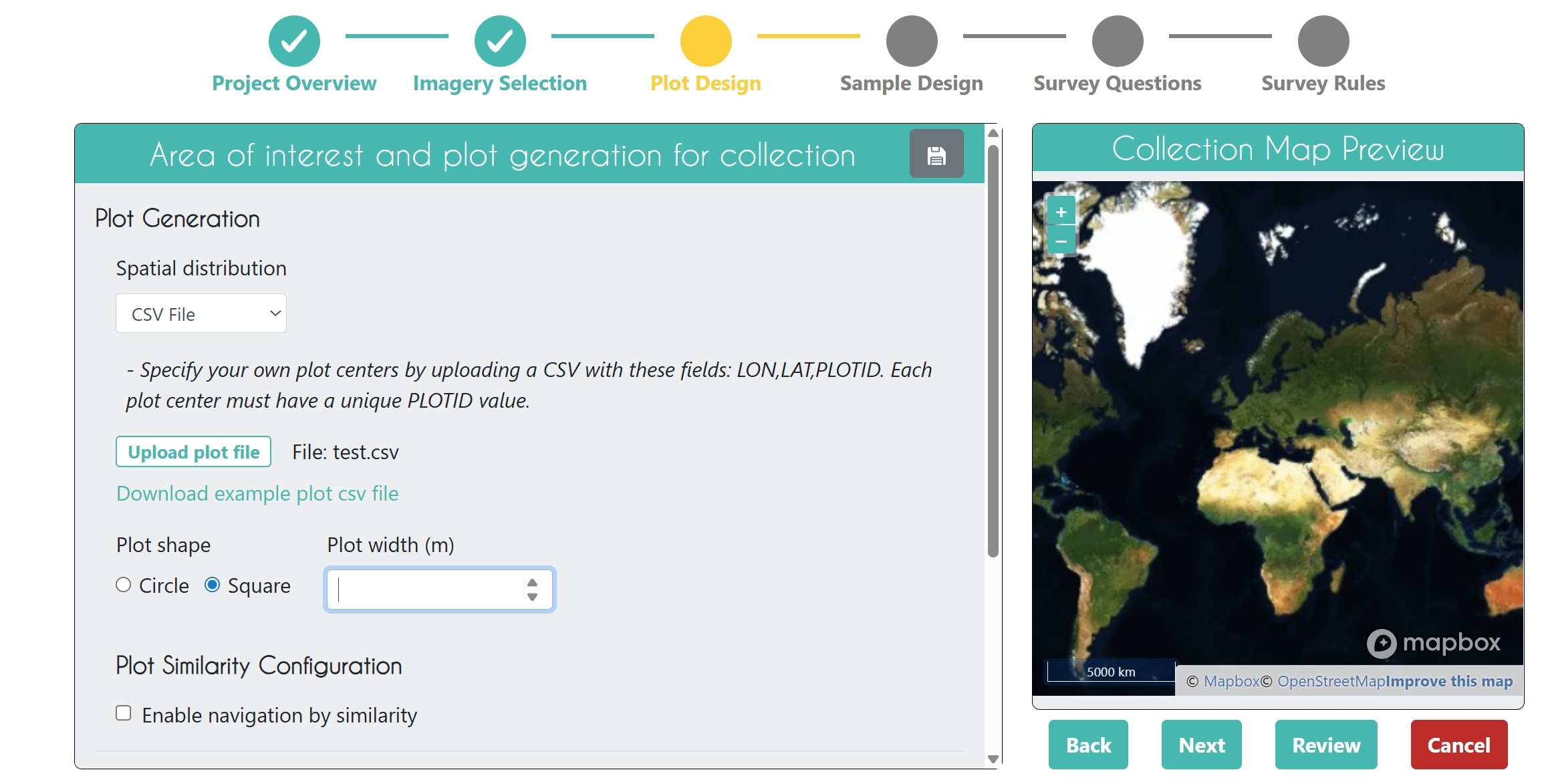
No matter what format data I try to use, CSV, SHP, etc. nothing seems to work in terms of uploading during the plot design phase for project creation. There are no error messages, I've tried correctly formatted (PLOTID,LAT,LON) and purposely incorrectly formatted files to the same effect. It seems to upload but there no longer is an automated AOI and plot points overlaid on the map. Is the system simply not working any more or is there something else potentially wrong?

Update:

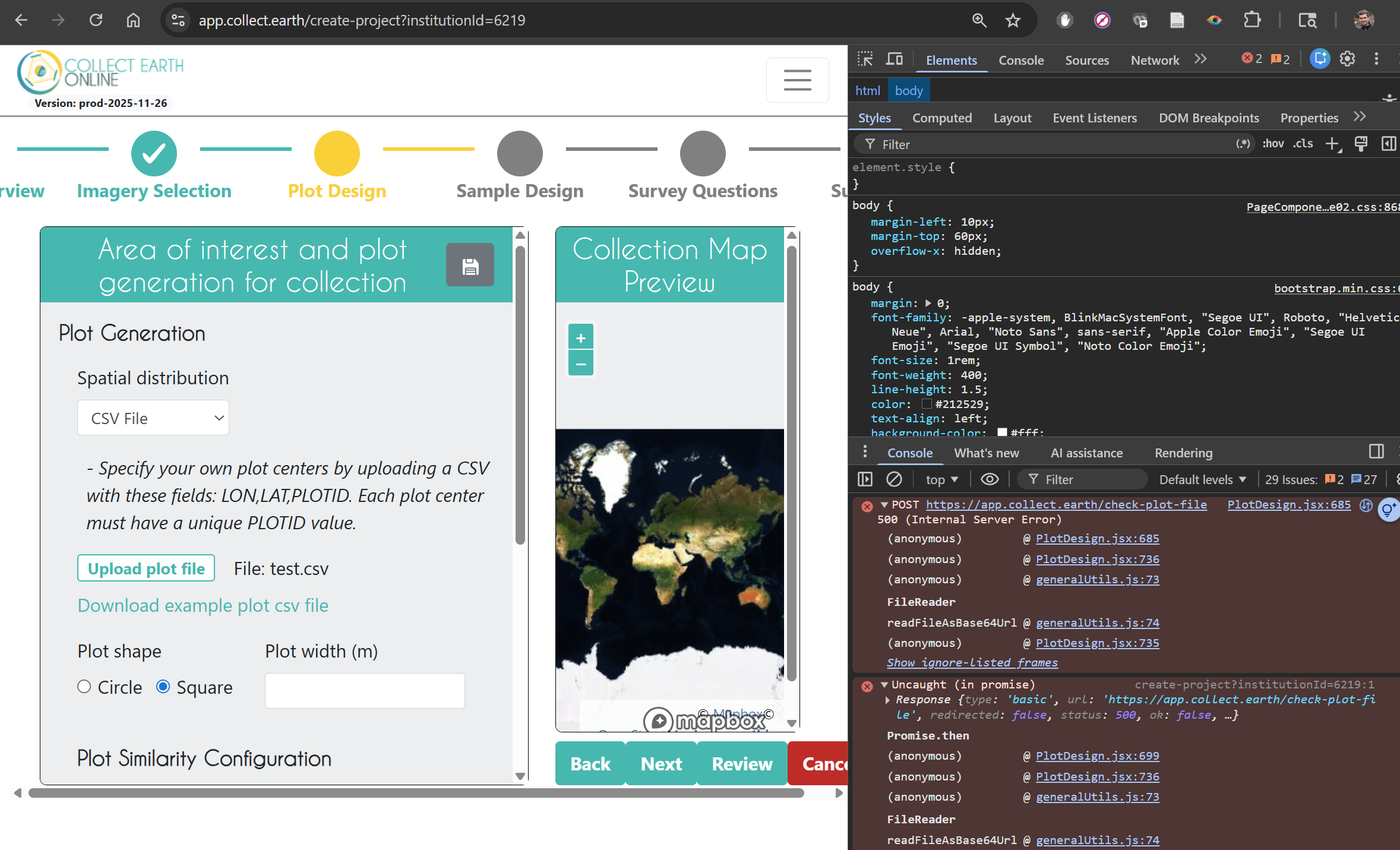
After running some more tests, and checking the JavaScript console upon CSV upload it appears there's a 500 server error on POST during the upload/processing request:

It appears that on upload of any file there's a 500 error being returned by the server: https://i.gyazo.com/61aa14405f8915774146c1b83de93d6e.png

It seems very likely that it's a backend issue?

PlotDesign.jsx:685  POST https://app.collect.earth/check-plot-file 500 (Internal Server Error)
(anonymous) @ PlotDesign.jsx:685
(anonymous) @ PlotDesign.jsx:736
(anonymous) @ generalUtils.js:73
FileReader
readFileAsBase64Url @ generalUtils.js:74
(anonymous) @ PlotDesign.jsx:735
Rb @ react-dom.production.min.js:52
Xb @ react-dom.production.min.js:52
Yb @ react-dom.production.min.js:53
Ze @ react-dom.production.min.js:100
se @ react-dom.production.min.js:101
(anonymous) @ react-dom.production.min.js:113
(anonymous) @ react-dom.production.min.js:292
Nb @ react-dom.production.min.js:50
jd @ react-dom.production.min.js:105
yc @ react-dom.production.min.js:75
hd @ react-dom.production.min.js:74
(anonymous) @ scheduler.production.min.js:18
gg @ react-dom.production.min.js:122
(anonymous) @ react-dom.production.min.js:292
gd @ react-dom.production.min.js:73
create-project?institutionId=6219:1 Uncaught (in promise) Response {type: 'basic', url: 'https://app.collect.earth/check-plot-file', redirected: false, status: 500, ok: false, …}
Promise.then
(anonymous) @ PlotDesign.jsx:699
(anonymous) @ PlotDesign.jsx:736
(anonymous) @ generalUtils.js:73
FileReader
readFileAsBase64Url @ generalUtils.js:74
(anonymous) @ PlotDesign.jsx:735
Rb @ react-dom.production.min.js:52
Xb @ react-dom.production.min.js:52
Yb @ react-dom.production.min.js:53
Ze @ react-dom.production.min.js:100
se @ react-dom.production.min.js:101
(anonymous) @ react-dom.production.min.js:113
(anonymous) @ react-dom.production.min.js:292
Nb @ react-dom.production.min.js:50
jd @ react-dom.production.min.js:105
yc @ react-dom.production.min.js:75
hd @ react-dom.production.min.js:74
(anonymous) @ scheduler.production.min.js:18
gg @ react-dom.production.min.js:122
(anonymous) @ react-dom.production.min.js:292
gd @ react-dom.production.min.js:73
create-project?institutionId=6219:1 Uncaught (in promise) Error: A listener indicated an asynchronous response by returning true, but the message channel closed before a response was received

Here's the minimal data file that I'm trying to upload as a CSV test case:

PLOTID,LON,LAT
1,0,0
2,1,1

asked yesterday

FRS's gravatar image

FRS
112
accept rate: 0%

edited yesterday


Hello,

Thank you for reaching out. To make sure I’m understanding the issue correctly, are you unable to create a project at all, or is the problem specifically that the preview isn’t displaying as expected? Any additional detail you can share will help us narrow it down. Also, if you can email any of the files to support@collect.earth, we can take a closer look and help troubleshoot.

Best,

-Shanna

permanent link

answered yesterday

shobbs's gravatar image

shobbs
1212
accept rate: 7%

Thanks for the response! I've worked through various approaches and tried everything I could think of to provide both "correct" and incorrectly formatted CSV files during the Plot Design stage of a new project creation. The project can be saved in draft form, and I can create projects using an AOI and random plot or gridded plot locations without any errors. But while trying to provide plot locations via CSV it fails silently. I've also tried to use plot boundaries provided via SHP and GeoJSON and neither of those uploads work either.

(yesterday) FRS FRS's gravatar image

And just to note, I've used the barest minimum of test files to try to figure out whether it's header row issues, data issues... I've saved as UTF-8 CSVs, with and without string delineators, etc. The "sample" CSV you download during this step has never worked to simply reupload, but even it fails silently now whereas it used to throw an error on screen due to incorrectly labeled columns if I recall correctly.

https://i.gyazo.com/9451b8cf5ef6c643d4912218d9b935d7.jpg

PLOTID,LON,LAT 1,0,0 2,1,1

(yesterday) FRS FRS's gravatar image

It appears that on upload of any file there's a 500 error being returned by the server: https://i.gyazo.com/61aa14405f8915774146c1b83de93d6e.png

It seems very likely that it's a backend issue?

(yesterday) FRS FRS's gravatar image
Your answer
toggle preview

Follow this question

By Email:

Once you sign in you will be able to subscribe for any updates here

By RSS:

Answers

Answers and Comments

Markdown Basics

  • *italic* or _italic_
  • **bold** or __bold__
  • link:[text](http://url.com/ "title")
  • image?![alt text](/path/img.jpg "title")
  • numbered list: 1. Foo 2. Bar
  • to add a line break simply add two spaces to where you would like the new line to be.
  • basic HTML tags are also supported

Question tags:

×53

question asked: yesterday

question was seen: 60 times

last updated: yesterday