The Google Earth Engine App used by Collect Earth to display NDVI and Landsat/Sentinel imagery is not working or it is really slow loading the graphs.

This started happening last week around the time that Google Earth Engine updated their license to Tiers.

asked 22 hours ago

collector's gravatar image

collector
12682333
accept rate: 0%


Question

The Google Earth Engine App used by Collect Earth to display NDVI and Landsat/Sentinel imagery is not working. How can I update the URL used by Collect Earth?

Answer

Due to recent changes in Google Earth Engine, the URL previously used by Collect Earth to connect to the Google Earth Engine App for NDVI data and Landsat/Sentinel imagery had to be changed.

Until this is included in a future Collect Earth update, you can manually configure the new URL in Collect Earth.

Steps to update the URL

  1. Open Collect Earth.

  2. Go to:

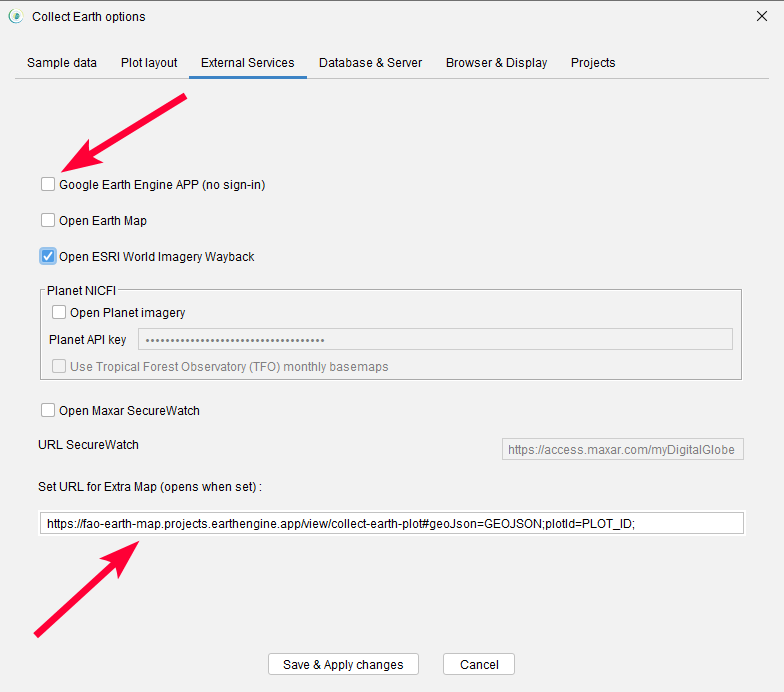
Properties -> External Services

  1. Disable the option:

Google Earth Engine App without login

  1. In the last field, where you can configure the URL for the Extra Map, enter the following URL:

https://fao-earth-map.projects.earthengine.app/view/collect-earth-plot#geoJson=GEOJSON;plotId=PLOT_ID;

  1. Click:

Save and Apply Changes

  1. Try opening the plots again and check whether the NDVI and Landsat/Sentinel imagery are now displayed correctly.

Important requirement

You need to have the latest version of Collect Earth installed for this configuration to work. alt text

Additional note

This change is related to the Google Earth Engine App URL. If the problem continues after updating the URL, the issue may be unrelated to the URL change and could be linked to another configuration or licensing issue.

permanent link

answered 22 hours ago

Open%20Foris's gravatar image

Open Foris ♦♦
1.1k5714
accept rate: 10%

edited 22 hours ago

Your answer
toggle preview

Follow this question

By Email:

Once you sign in you will be able to subscribe for any updates here

By RSS:

Answers

Answers and Comments

Markdown Basics

  • *italic* or _italic_
  • **bold** or __bold__
  • link:[text](http://url.com/ "title")
  • image?![alt text](/path/img.jpg "title")
  • numbered list: 1. Foo 2. Bar
  • to add a line break simply add two spaces to where you would like the new line to be.
  • basic HTML tags are also supported

Question tags:

×293

question asked: 22 hours ago

question was seen: 42 times

last updated: 22 hours ago