Installing Open Foris Collect and Collect Earth in MacOS ( Mojave/Catalina)

  • Asked
  • Active
  • Viewed 6274 times
0

Hello,

I would like to install Collect and Collect Earth in my Mac computer but I keep getting this error :

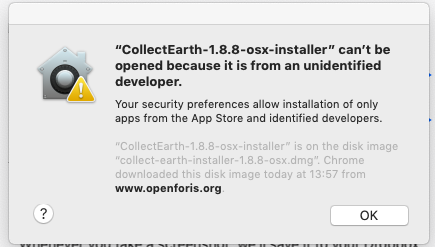
"collect-earth-1.8.8-osx-installer" can't be opened because it is from an unidentified developer

Then I do not have any option to install the software...

Is it possible to install Open Foris tools in Mac ??

Thanks

0

Accepted answer

Hi there,

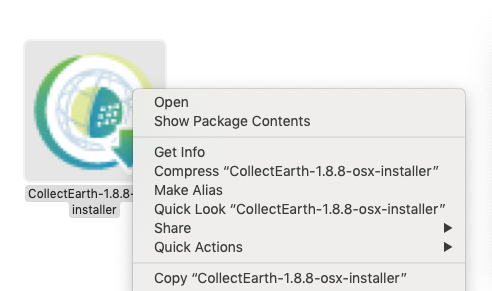
As with any Mac applications "from an unidentified developer", please right-click on it and open it to launch it.

Thanks.

0

Accepted answer

All Open Foris tools (being web or Java based) work in Mac computers!

Ok, a bit weird you may think as this is the kind of dialog that you see when you try to run the installer :
alt text

Sadly we haven't had so much time to fix this installation issue, this means that in order to install Collect/Calc/Collect Earth you need to "unlock" the installers. This is fairly easy to do. Instead of double-clicking on the installer when you download it, you should click on it with your shitf-key pressed. That opens a contextual dialog, then you choose the first option, "Open"
alt text

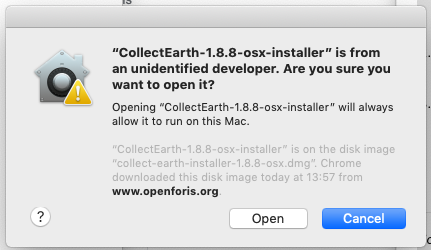
Now the dialog that comes out you see has an "Open" button that you can click on to start the installation :
alt text

This is a link on the MacOS support system about how to do this process in some other ways : https://support.apple.com/guide/mac-help/MH40616/10.14/mac/10.14.3

0

Accepted answer

Also, keep in mind that another difference between the Windows/Linux version and the MacOS version is that in order to open a CEP file you cannot just double click the CEP file (this will open Collect Earth, but NOT load the CEP)

In order to load the project CEP file you need to go to the File->Import CEP file menu item

alt text

Your answer

Markdown text. Shortcuts: Ctrl+B bold, Ctrl+I italic, Ctrl+K link, Ctrl+E code, Ctrl+Shift+V paste as plain text. Tab indents list items and code; press Escape, then Tab, to leave the text box.

Insert an image

Say what the image shows, for people who can't see it.

Keyboard shortcuts

Anywhere

?
Show this list
/
Search
g h
Go to the home page
g q
Go to the questions
g t
Go to the tags
g u
Go to the users
a
Ask a question

Lists of questions

j k
Next or previous question
Enter
Open the question

Question pages

j k
Next or previous post

Shortcuts never apply while you type in a text field. Members can turn them off in their preferences.